Wallpaper Engine Alternatives for Mac: 2026 Roundup
Wallpaper Engine is Windows-only. Here's an honest look at the actual options for live, interactive wallpapers on Mac in 2026, Novaframe included.
Wallpaper Engine is the name everyone searches, and it doesn't run on Mac or MacBook. It's a Steam app, Windows-only, and Valve has shown no sign of bringing it over. (For our direct side-by-side spec comparison, see our Wallpaper Engine for Mac native alternative breakdown.) So here's what your actual options are if you're on macOS in 2026.
The built-in option: Dynamic Desktop
Free, already on your Mac, zero setup. It cycles through a handful of time-of-day images rather than rendering anything live. Fine if you want something that changes and don't want to install anything. Not what most people mean by "live wallpaper" — it's cross-fading stills, not motion.
Video-loop wallpaper apps
A category of apps that play a looping video file as your desktop background. Pro: huge variety, since anyone can export a video clip and drop it in. Con: your CPU is decoding video continuously the entire time it's visible, which is the actual source of the "live wallpapers kill your battery" reputation. If you go this route, keep the clip short and low-resolution, and know you're trading battery for content variety.
Screensaver-as-wallpaper hacks
A handful of tools let you run a macOS screensaver (like the Aerials) as your actual desktop background instead of only when idle. Neat trick, same cost profile as video-loop apps underneath — it's still decoding footage — plus these tend to be less actively maintained since they're built around a macOS API that wasn't meant for this.
Rendered-scene engines (where Novaframe sits)
The other approach: don't play back footage at all, render a scene procedurally on the GPU every frame. No video file to decode, no fixed loop to notice repeating, and it can respond to things — time of day, system state, or just built-in controls you tune yourself. The tradeoff going in is a smaller content library than "any video anyone's ever exported," because each scene has to be built, not just found. What you get back is lower cost per hour of use and something that doesn't have an obvious seam where it loops.
I'm obviously not neutral here — I explain why the OffscreenCanvas approach costs less than video loops if you want the technical case rather than just my word for it. We also maintain a detailed side-by-side comparison of Wallpaper Engine vs Novaframe on macOS.
Multi-monitor and laptop setups: what to expect
If you are coming from Windows, Wallpaper Engine lets you assign different wallpapers per display or span wide scenes across three monitors. On macOS:
- Hot-plugging and clamshell mode: When you plug in an external monitor, change your main display, or close your MacBook lid into clamshell mode, Novaframe safely re-anchors to the active display and scales resolution dynamically.
- Secondary screens: Novaframe currently animates on your primary display rather than running separate instances per monitor. The upside on laptops is that battery overhead doesn't compound per connected display; the tradeoff is that secondary displays keep their standard macOS wallpaper for now. Check our display corridors for MacBook Pro 16, MacBook Pro 14, MacBook Air 15, or Apple Studio Display 5K to see calibrated resolutions.
The translation layer route: CrossOver, Wine, and Whisky
A common question from Mac gamers is whether they can simply run Wallpaper Engine through CrossOver, Whisky, or Wine.
While the Windows Steam client opens inside an Apple Silicon Wine bottle, Wallpaper Engine cannot function as an actual live desktop wallpaper:
- No desktop anchoring: Wallpaper Engine relies on Win32 desktop window layering (
WorkerWand Direct3D hooks). macOS Quartz Compositor does not expose these endpoints through Wine, meaning the wallpaper renders as an ordinary floating application window instead of drawing beneath your desktop icons. - Continuous 35%+ CPU load: Translating DirectX drawing calls into Metal via DXVK keeps the CPU hot and empties a MacBook battery in less than two hours.
- Display sleep crashes: Background Wine processes regularly hang or terminate when macOS puts the display to sleep or when you close your MacBook lid.
Running a translation layer for background desktop animation is fundamentally counter-productive; native Metal/WebGL rendering is the only architecture that holds under 1% CPU on macOS.
Which one to actually pick
- Want zero setup, don't care about real motion: Dynamic Desktop, you already have it.
- Want maximum variety, don't mind the battery cost: video-loop apps.
- Want multi-monitor spanning and running Windows on Steam: Wallpaper Engine.
- Tried Wine/CrossOver and ran into high CPU or floating windows: stick to a native macOS engine.
- Want desktop widgets, system clocks, or Rainmeter skins: see our guide on Rainmeter for Mac alternatives.
- Want something that looks alive continuously, costs little CPU/battery, and handles MacBook docking cleanly: a rendered-scene engine — that's the Novaframe bet. Compare the features directly on our Wallpaper Engine for Mac alternative guide or see the catalogue.
No single right answer here — it depends what you're actually optimizing for.
Mercator Chronos
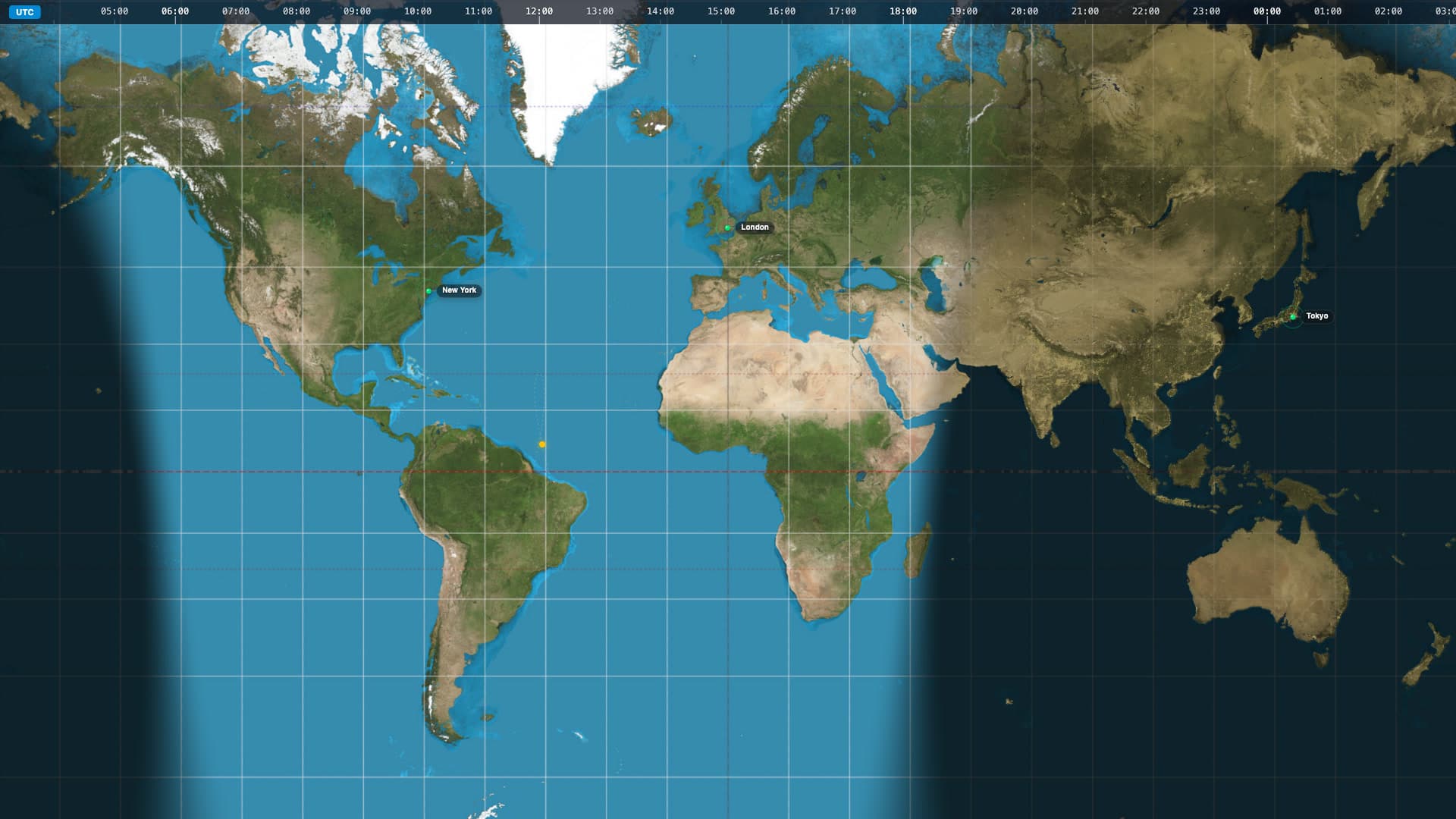
Transform your desktop into a live, global command centre with Mercator Chronos. This dynamic wallpaper brings the Earth’s natural day-night cycle directly to your screen in a stunning, high-definition cylindrical projection. As time passes, the dynamic terminator shadow sweeps across the map, plunging regions into beautifully rendered nightscapes illuminated by glowing city lights. Whether you use it to track time zones, monitor global events, or simply enjoy a highly functional and data-rich aesthetic, this wallpaper provides a sophisticated, constantly evolving backdrop.
Run this as a live wallpaper with Novaframe
Novaframe is the free desktop engine behind these wallpapers — real-time shaders rendered on your GPU, not video loops. Download it once, then apply anything from the catalogue in one click.
Frequently asked questions
Related articles
macOS Sequoia Wallpaper Keeps Resetting to Default? Here Is the Permanent Fix
Fix the persistent macOS Sequoia bug where custom desktop wallpapers revert to default after reboot, sleep, or external monitor disconnect.
4 min readDual Monitor Live Wallpapers on Mac: Performance, Clamshell & Setup Guide
Everything you need to know about running live, animated wallpapers on Mac multi-monitor setups, external 4K displays, and clamshell mode.
4 min readDoes Rainmeter Work on Mac? Best macOS Alternatives in 2026
Rainmeter does not run on macOS. Explore the top native Mac alternatives for desktop customization, widgets, system stats, and GPU-accelerated live wallpapers.
5 min read